In January 2025, a group called Codefinger ran S3 ransomware that encrypted victims’ data using AWS’s own encryption feature, then demanded payment for the key. No exploit and no AWS vulnerability were involved, only stolen access keys and one legitimate API option.
That makes the defense unusually simple. A single resource control policy (RCP) of about 15 lines, published by AWS itself, blocks the technique across every account in an AWS Organization.
This post breaks down the attack from the published research, explains why it is unrecoverable, gives the exact policy and shows how to prove it blocks. It also covers what the policy does not protect, and a change AWS made in April 2026 that affects whether you still need it.
How the Codefinger attack works
The Halcyon RISE Team published the research on January 13, 2025. Halcyon identified two victims, neither of them Halcyon customers at the time, and said both were AWS-native software developers. Halcyon called it the first known in-the-wild use of AWS’s native SSE-C encryption for ransomware.
Stolen keys are how most AWS breaches start, and this one was no different. The attack has four steps:
- Get a key. The attacker uses publicly disclosed or compromised AWS keys that can read and write S3 objects, meaning
s3:GetObjectands3:PutObject. - Re-encrypt in place. Using server-side encryption with customer-provided keys (SSE-C), the attacker rewrites each object with an AES-256 key it generated locally and never shares.
- Set a deadline. The attacker uses the S3 Object Lifecycle Management API to mark the files for deletion within seven days.
- Leave a note. A ransom note in the bucket gives payment details. According to The Register, the attackers did not threaten to leak or sell the data; the pressure is the deletion timer.
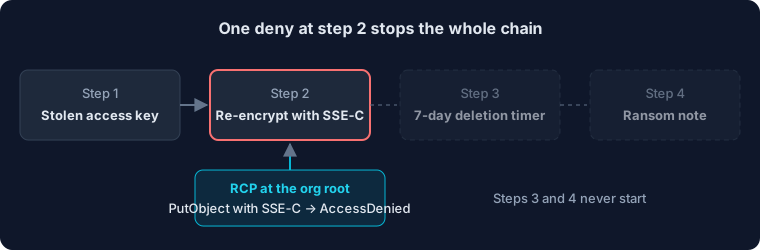
Every later step depends on step 2. If the SSE-C write is denied, there is nothing to ransom.
AWS’s own incident responders saw the same pattern. The AWS Customer Incident Response Team reported a large number of S3 CopyObject operations using SSE-C that overwrote objects, re-encrypting customer data with a new key. AWS stressed that the activity used valid credentials, not a vulnerability in any AWS service.
Why is SSE-C ransomware unrecoverable?
SSE-C was designed so that AWS never keeps your key. S3 never stores the encryption key when you use SSE-C; the caller must supply it on every request to read the data. That is a privacy feature for legitimate users and exactly what makes it useful to an attacker.
The logs do not help either. Halcyon noted that AWS CloudTrail logs only an HMAC of the encryption key, which is not enough to recover the data or for forensic analysis. Without a backup copy, the only way to read the files again is the attacker’s key.
The permissions needed are ordinary ones. Any key that can read and write objects in a bucket can do this, which describes most application keys that touch S3.
The RCP that blocks SSE-C writes
This is the RCP AWS published in its January 2025 guidance on preventing unintended encryption of S3 objects. Attached at the organization root, it denies any S3 write that carries an SSE-C key, in every member account:
{
  "Version": "2012-10-17",
  "Statement": [
    {
      "Sid": "RestrictSSECObjectUploads",
      "Effect": "Deny",
      "Principal": "*",
      "Action": "s3:PutObject",
      "Resource": "*",
      "Condition": {
        "Null": {
          "s3:x-amz-server-side-encryption-customer-algorithm": "false"
        }
      }
    }
  ]
}
How it reads. The Null condition with "false" means “the SSE-C algorithm header is present.” Any PutObject request that includes that header is denied, whoever sends it. Requests without the header, including normal SSE-S3 and SSE-KMS uploads, are unaffected. The s3:PutObject permission also governs copies into a bucket, which covers the CopyObject pattern AWS’s responders observed.
Why an RCP and not a bucket or IAM policy. AWS also offers the same statement as a bucket policy. The RCP is stronger for three reasons:
- It covers every bucket in every member account, including ones created tomorrow.
- It lives in the management account, so a stolen key in a member account cannot remove it. A bucket policy can be rewritten by anyone with
s3:PutBucketPolicy. - Per AWS, a permission blocked by an RCP is blocked even if the resource owner attaches a resource-based policy that allows full access.
If a workload genuinely uses SSE-C, add a condition that exempts that bucket or role rather than dropping the policy.
Rolling it out
The policy is small, but a deny at the organization root deserves a staged rollout.
- Find any real SSE-C use first. AWS suggests checking CloudTrail S3 data events for the
requestParameters.x-amz-server-side-encryption-customer-algorithmvalue, and using S3 Inventory to see which buckets already hold SSE-C objects. - Enable the RCP policy type. In AWS Organizations, enable resource control policies. Enabling them automatically attaches RCPFullAWSAccess to the root, every OU and every account, so nothing changes yet.
- Attach to a test OU. Create the policy and attach it to a sandbox OU first.
- Prove it blocks. From a test account, try an SSE-C upload. It should fail with AccessDenied, while a normal upload still succeeds. The next section shows how to make this a repeatable test.
- Attach at the root. Once tested, move the attachment to the organization root.
What it does not cover. Know the gaps before relying on it:
- RCPs don’t affect resources in the management account. Keep data out of it, or protect those buckets with a bucket policy.
- RCPs do not apply to calls made by service-linked roles.
- It only blocks one technique. A stolen key with write access can still delete objects, overwrite them with junk, or set its own lifecycle rules.
- Accounts outside your organization are not covered.
The RCP removes the cleanest path to unrecoverable encryption. It does not make a leaked read-write key harmless.
How to test the RCP in your own account
A deny you have never seen fire is an assumption. cloud-firedrill turns the manual check above into a test you can run on every change to your guardrails. Its custom:s3-ssec-write technique does what Codefinger did, in a throwaway bucket:
- creates a temporary bucket in the sandbox account,
- tries to write an object with an SSE-C key generated on the spot,
- deletes the bucket again, whatever happened.
The scenario in prevention.yaml passes only if AWS denies the write:
- name: SSE-C write blocked by the RCP
  technique: custom:s3-ssec-write
  expect:
    - type: prevented
      error_codes: ["*"]
Run it in a sandbox account that sits under your RCPs:
firedrill plan prevention
firedrill run prevention --expected-account 111111111111 --confirm
A PREVENTED result means the policy works and records the exact error code AWS returned. A failed result means the write went through: the RCP is not attached to that account, or something exempts it. Running it in CI after every change to your organization policies catches the day someone detaches the RCP by accident.
AWS’s 2026 default change, and why the RCP still matters
AWS has since changed the default. Starting April 6, 2026, Amazon S3 began rolling out a setting that disables SSE-C for all new general purpose buckets, across 37 Regions over the following weeks. Existing buckets are covered too, but only in some accounts: if an account has no SSE-C encrypted objects, SSE-C is disabled on its existing buckets as well; if it has any, its existing buckets keep supporting SSE-C.
That is a strong secure default, and it closes the gap for many accounts. The RCP still adds value in three cases, based on how the setting works:
- Accounts that ever used SSE-C keep it enabled on existing buckets, so they get no protection from the new default.
- The setting lives on the bucket. Workloads that need SSE-C must enable it through the PutBucketEncryption API, so a stolen key with that permission could switch it back on. An RCP cannot be changed from a member account.
- Proof for auditors. One org-wide policy is easier to show than a per-bucket setting across hundreds of accounts.
Layers around the RCP
AWS’s guidance pairs blocking SSE-C with three other practices. Each one covers a gap the RCP leaves.
| Layer | What it adds | AWS guidance |
|---|---|---|
| Short-term credentials | Removes the long-lived key the attack starts with; AWS calls compromised long-term keys the root cause of this and a large portion of security events | IAM roles, IAM Identity Center, IAM Roles Anywhere |
| Data recovery | Restores overwritten or deleted objects | S3 Versioning, S3 replication to another account or Region, or AWS Backup for S3 |
| Monitoring | Catches the attempt and other destructive actions | CloudTrail and S3 server access logs, CloudWatch alarms, EventBridge and Lambda automation |
| Threat detection | Flags ransomware behaviour | GuardDuty S3 Protection with Extended Threat Detection, which AWS says can detect potential SSE-C ransomware attempts |
Versioning alone has a weakness here: the attacker’s lifecycle rule can expire old versions. Keep a copy in a separate account the original credentials cannot touch, or use S3 Object Lock for data that must not be deleted, a feature Singapore’s Cyber Security Agency pointed to in its advisory on this campaign.
Conclusion
Codefinger needed no exploit: a leaked key and one legitimate header were enough to make data unrecoverable. AWS’s April 2026 default now blocks SSE-C on new buckets and in accounts that never used it, which helps many organizations.
The RCP is still the cheapest insurance available for the rest. It takes minutes to deploy, cannot be removed by a compromised member account, and covers buckets the new default leaves open. Pair it with short-lived credentials and a backup the attacker cannot reach, and this attack has no payoff.
Related reading
- What public AWS breaches actually teach us: why stolen keys, not CVEs, start most AWS incidents
- cloud-firedrill: run prevention, detection and alerting tests in your own sandbox
Sources
Primary research and AWS guidance
- Halcyon RISE Team: Abusing AWS native services, ransomware encrypting S3 buckets with SSE-C
- AWS Security Blog: Preventing unintended encryption of Amazon S3 objects
- AWS What’s New: S3 default bucket security setting, April 2026
- AWS Storage Blog: Advance notice of disabling SSE-C by default
- Amazon S3 User Guide: Using SSE-C
- AWS Organizations User Guide: Resource control policies
- Cyber Security Agency of Singapore: Alert AL-2025-006
News coverage and analysis
- The Register: Ransomware crew abuses AWS native encryption
- SecurityWeek: Compromised AWS keys abused in Codefinger attacks
- The Record: Codefinger hackers encrypting Amazon cloud buckets
- Security Affairs: Codefinger encrypts S3 buckets
- Cyber Security News: Ransomware encrypts S3 buckets using SSE-C
- Rewind: How we stopped SSE-C ransomware with an RCP
- Elastic Security Labs: Emulating AWS S3 SSE-C ransom
- Native Security: AWS RCPs explained